Loyalty Cards Movement
alameen ERP provides detailed reports on the movement of loyalty cards, to help you follow up their movement and balance, including the "Loyalty Cards Movement" report.
Report Purpose
The "Loyalty Cards Movement" report gives the details of the movement of the loyalty cards you give to customers: the sales value and the points.
The report shows the card information: the sales value and the points earned and redeemed, as well as the information of your company file and database, and the branch in which the loyalty card moved (if you use the branches system).
You can view detailed information about the loyalty card in the report by selecting the fields you need from the field list in the report preview window.
Reaching the Report
You can reach the Loyalty Cards Movement report from the main ribbon - POS tab - Offers and Discounts group - the drop-down list of the Loyalty Cards button.
After you request it, the report window opens as follows:
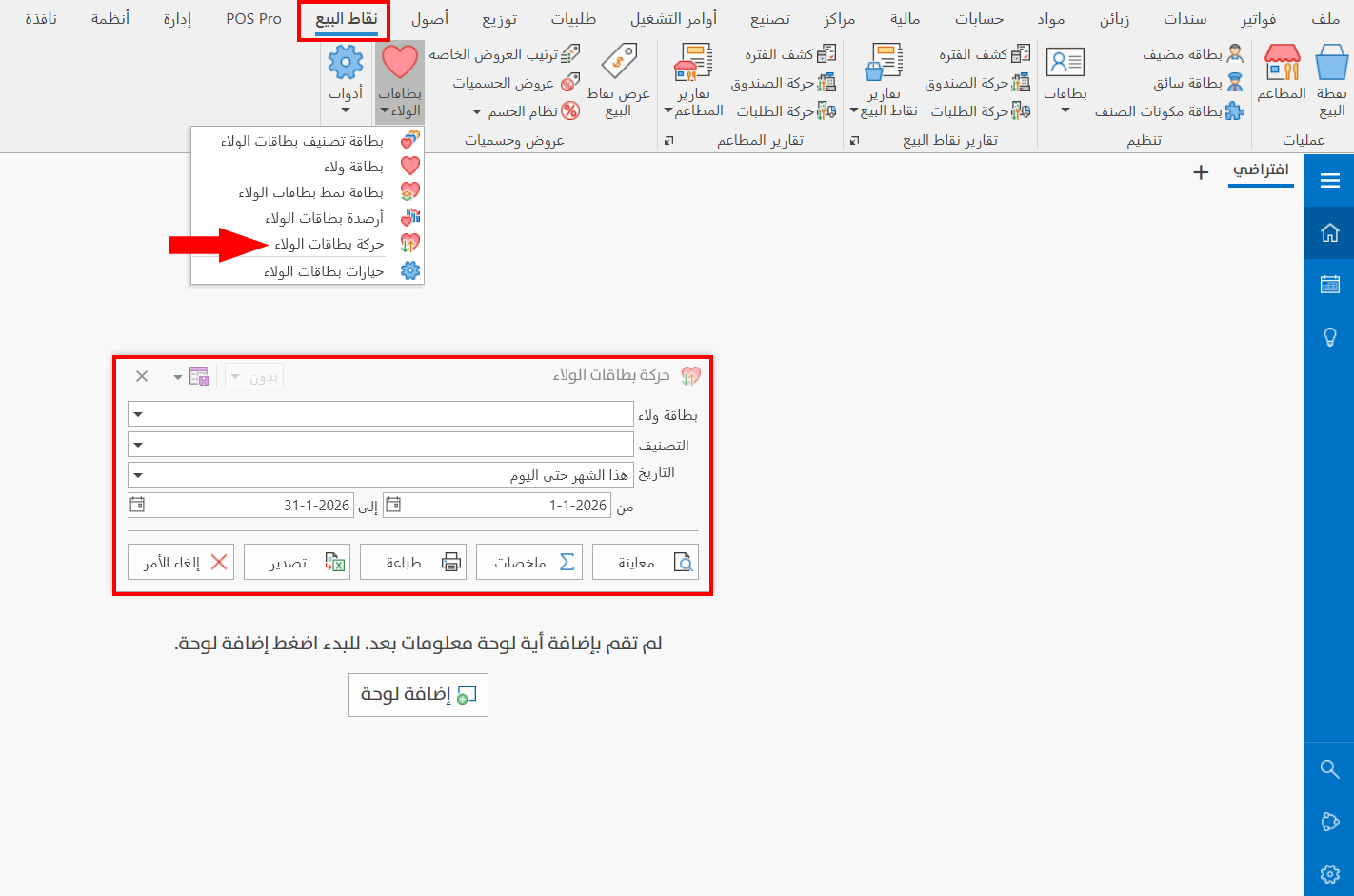
The report window contains various fields and options that help you view the details you need.
Report Window
The window lets you set the criteria and data you want the report to show. The window includes several main fields, such as Loyalty Card and the Type field, for reaching the report data you need.
For more details, go to Report Window.
Report Window Operations
You can perform many operations on the report data, such as previewing and exporting.
Please see Report Window Operations.