Shipping Report
alameen ERP provides detailed reports on the movement of materials to help you follow up shipping operations, including the "Shipping Report".
Report Purpose
The Shipping Report gives the details of shipping materials from one warehouse to another: it shows the shipped materials and the "shipping form" used, after it is added on the Shipping tab of the "Forms Management" window.
The report shows the goods in transit warehouse, the shipping warehouse, and the receipt warehouse, as well as the shipping and receiving branches if you use the branches system.
The report also shows the unit of the material used in shipping, the shipment and item status, and the shipped and received quantities, which helps you make sure that all the shipped materials were received.
Reaching the Report
You can reach the Shipping Report report from the main ribbon - Materials tab - Movement Reports group - the drop-down list of the Movement Reports button.
Once requested, the report window appears as follows:
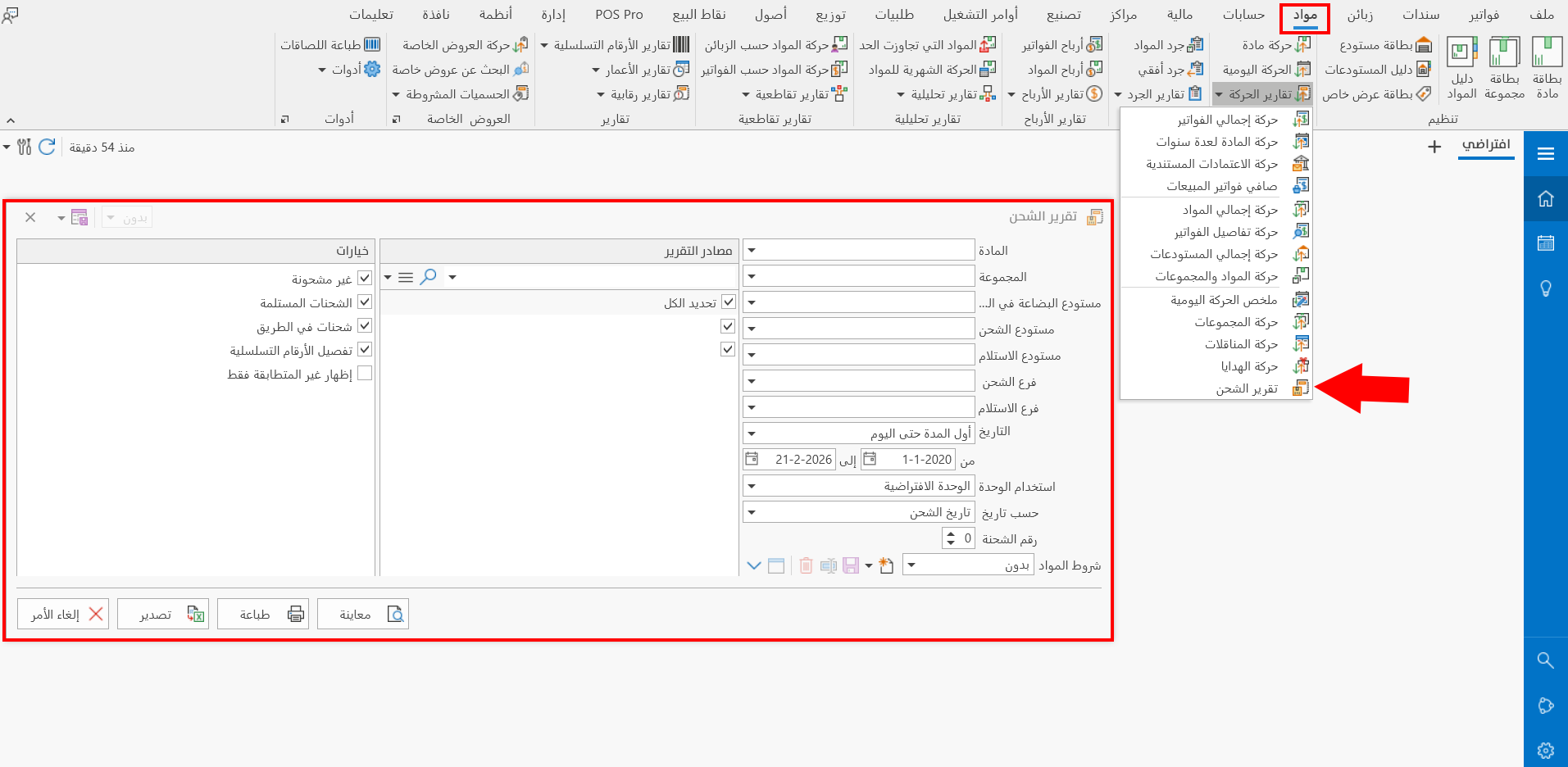
The report window contains various fields and options that help you view the details you need.
Report Window
The window lets you set the criteria and data you want the report to show. It includes several main sections, such as the filter fields, the materials terms, the various options, and the sources the report is drawn from.
For more details, go to Report Window.
Report Window Operations
You can perform many operations on the report data, such as previewing and exporting.
Please see Report Window Operations.