Letter of Credit Movement
alameen ERP provides detailed movement reports to help you follow up profits, inventory, and payments precisely, including the "Letter of Credit Movement" report.
Report Purpose
The "Letter of Credit Movement" report gives a statement of the letters of credit issued over a set period, or by their opening date, closing date, or estimated closing date.
The report shows the opening and closing dates of the letter of credit, its total value and total expenses, and gives the actual cost of the materials you bought in the invoices linked to the letter of credit you need.
You can view the movement of a letter of credit, of a main letter of credit (the results of all the letters of credit linked to it appear), or of the letter of credit account, and set the status of the letters of credit you need (opened letters of credit, closed letters of credit, empty letters of credit...).
Reaching the Report
You can reach the Letter of Credit Movement report from the main ribbon - Materials tab - Movement Reports group - the drop-down list of the Movement Reports button.
Once requested, the report window appears as follows:
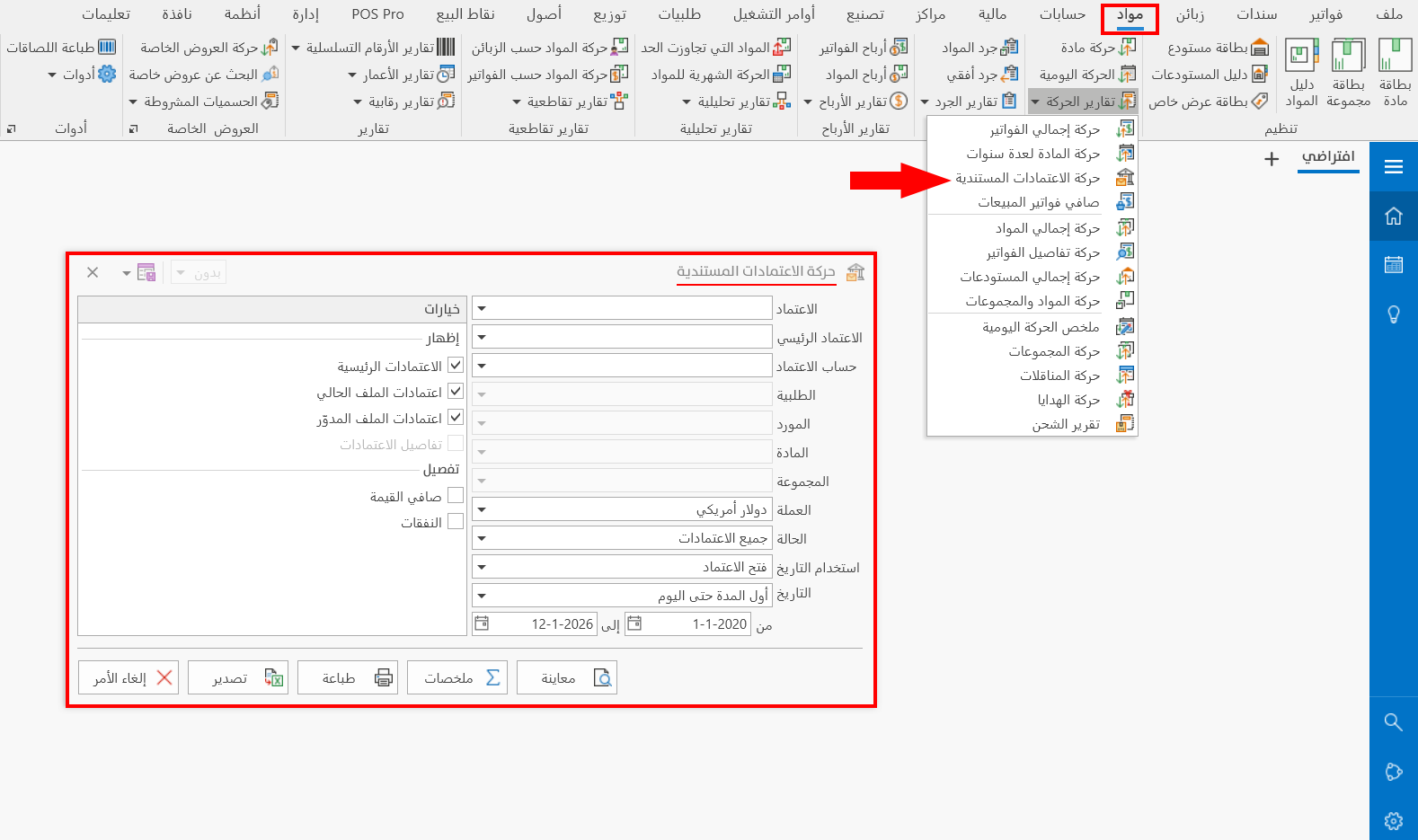
The report window contains various fields and options that help you view the details of the letters of credit movement.
Report Window
The window lets you set the criteria and data you want the report to show. It includes several main sections, such as the filter fields and the display and detail options.
For more details, go to Report Window.
Report Window Operations
You can perform many operations on the report data, such as previewing and exporting.
For more details, go to Operations in Reports.