Work Suspension Days
alameen ERP provides a set of analytical reports that cover the movement of groups, warehouses, and accounts, including the "Work Suspension Days" report.
Report Purpose
The "Work Suspension Days" report gives the number of days on which no movements (entries, invoices, commercial papers...) were recorded: the report shows the dates of the holidays according to the period you set in the report window.
A ready-made list drops down from the "Date" field of the report window for choosing the period you need. The available options include: beginning of period until today, previous month, previous quarter. When you choose the period, the date is filled in the "From" and "To" fields according to your choice, and you can also enter the period you want yourself in the "From" and "To" fields.
You can use the report to find the additional holidays you did not set in the program options window - Holidays tab.
Reaching the Report
You can reach the Work Suspension Days report from the main ribbon - Materials tab - Analytical Reports group - the drop-down list of the Analytical Reports button.
Once requested, the report window appears as follows:
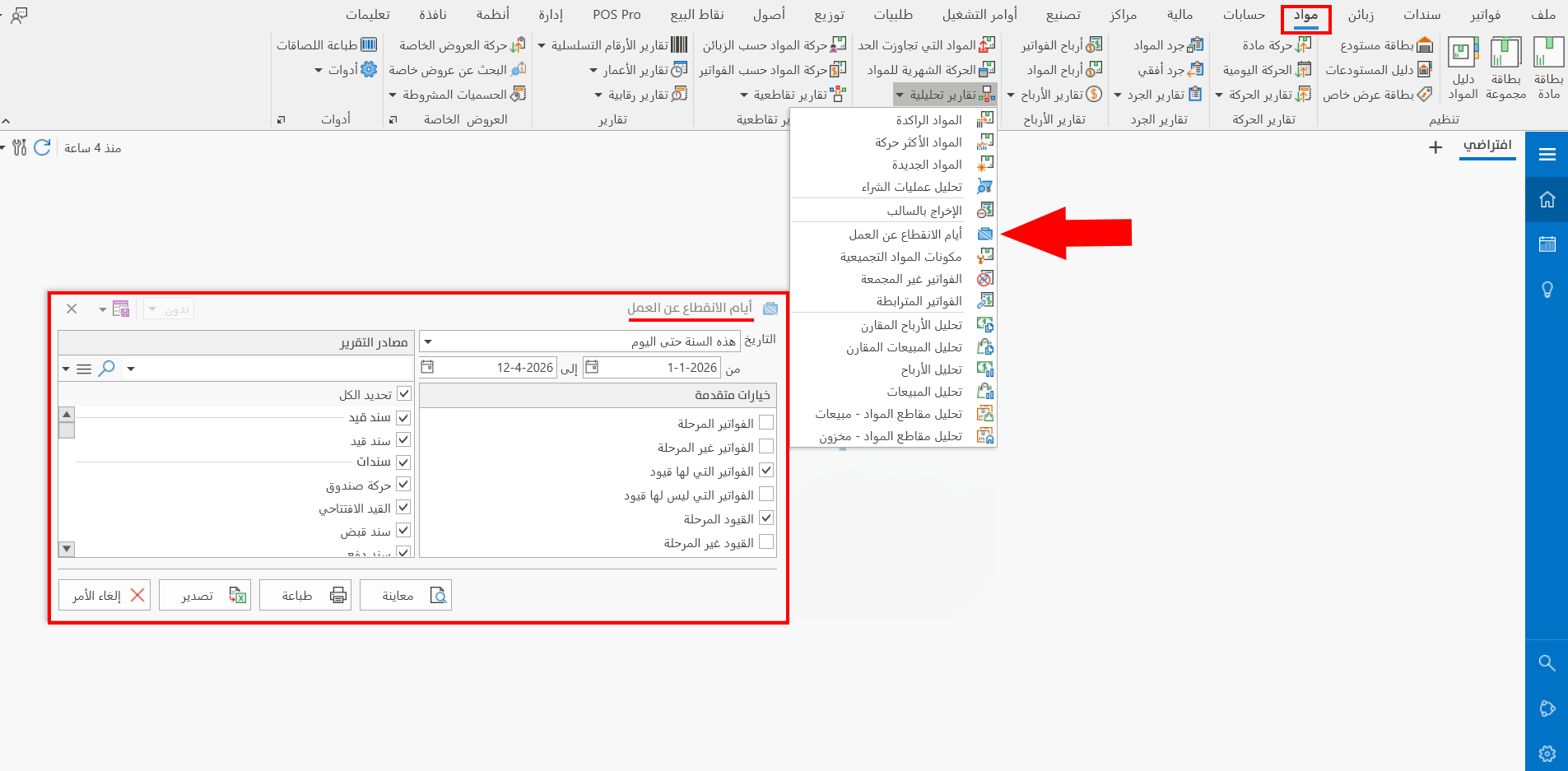
The report window contains various fields and options that help you view the details you need.
Report Window
The window lets you set the date or period of the data shown in the report, as well as a set of advanced options and the sources the report is drawn from.
For more details, go to Report Window.
Report Window Operations
You can perform many operations on the report data, such as previewing and exporting.
For more details, go to Operations in Reports.