Materials Exceeded Limit
alameen ERP provides detailed reports on materials to help you follow up their movement and quantity precisely, including the "Materials Exceeded Limit" report.
Report Purpose
The "Materials Exceeded Limit" report shows a statement of the materials whose stock rose above the maximum limit or fell below the minimum limit.
Set the maximum and minimum limits of each material separately in the "Material Limits" group of fields on the Units tab of the material card.
The report lets you find the materials that exceeded the limit in a particular group or warehouse, and offers a list of options for filtering the materials. For example, you can request the materials whose quantities are between two values you set yourself, the materials whose quantities are greater than or less than a particular number, or the materials whose quantities are below the re-order point.
Reaching the Report
You can reach the Materials Exceeded Limit report from the main ribbon - Materials tab - Analytical Reports group.
Once requested, the report window appears as follows:
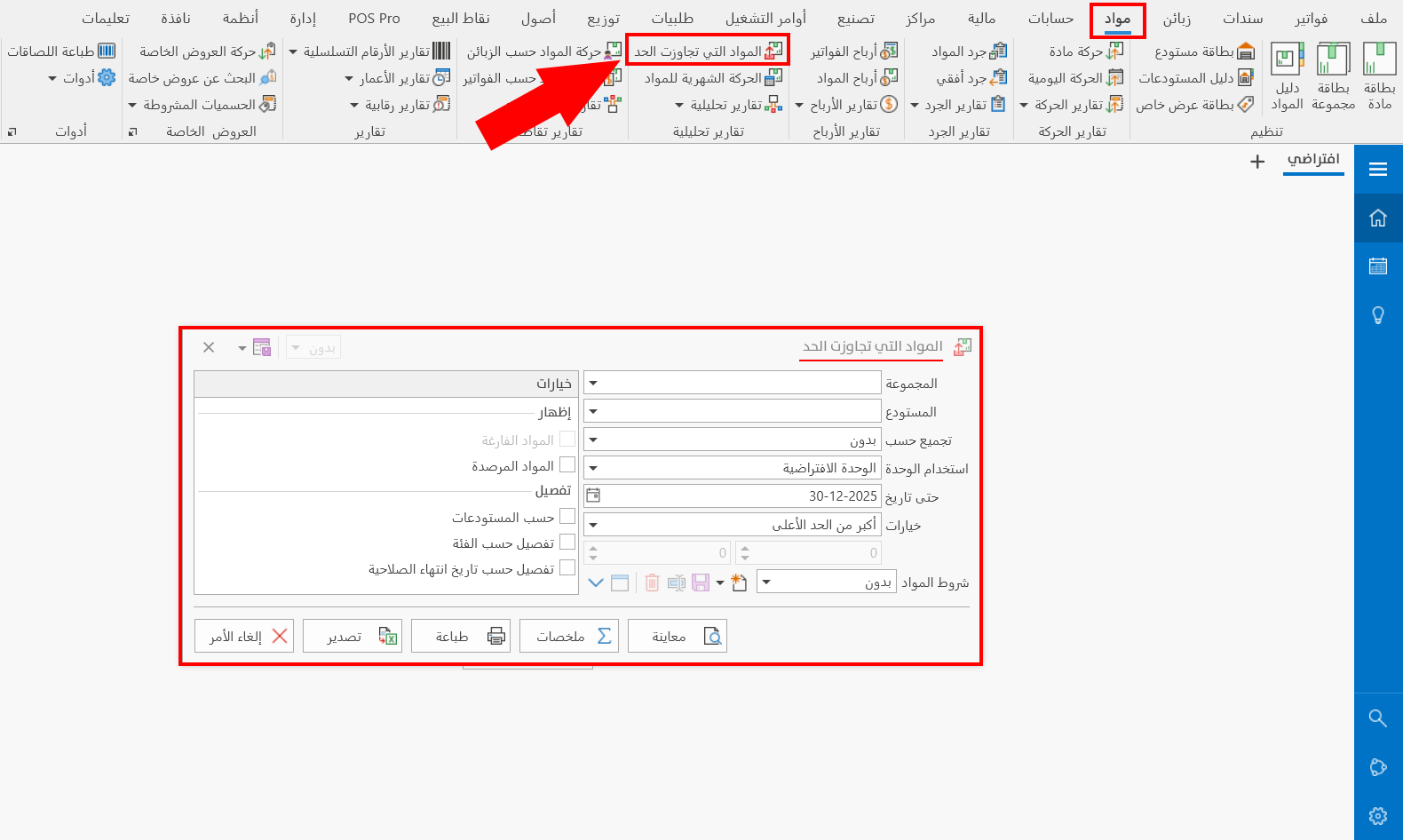
The report window contains various fields and options that help you view the materials that exceeded the limit.
Report Window
The window lets you set the criteria and data you want the report to show. It includes several main sections, such as the filter fields, the limit options (greater than, less than, between...), the materials terms, and the various options for showing fields and details in the report.
For more details, go to Report Window.
Report Window Operations
You can perform many operations on the report data, such as previewing and exporting.
For more details, go to Report Window Operations.