Chart Operations
You can carry out many operations in the chart window after right-clicking one of the chart's rows.
The available operations are gathered below:
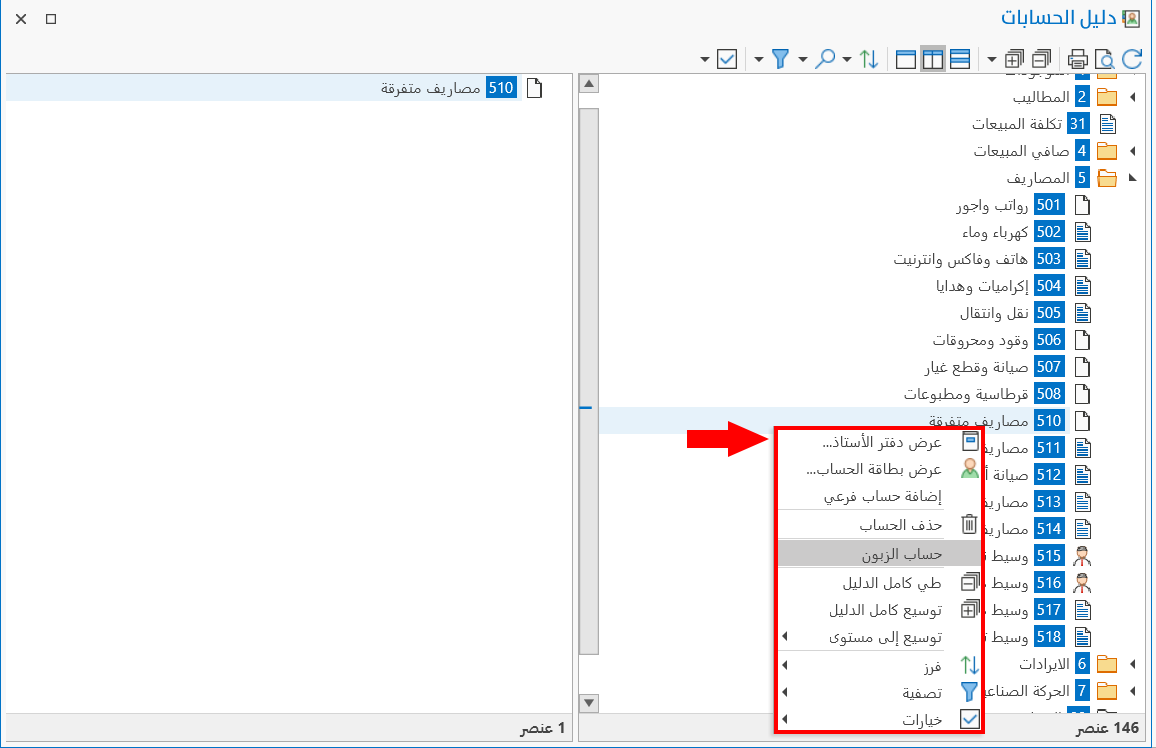
Show Card
You can show a card (account, material, country, city, region, group, warehouse, cost center, branch, main letter of credit), and modify or delete it.
Add Card
The program lets you add a card directly from the chart without closing it: you can add a card (account, material, customer, group, branch, warehouse, country, city, region, manufacturing form, letter of credit, main letter of credit).
Show Ledger
Shows the Ledger report window for the selected account.
Show Daily Movement
Shows the Daily Movement report window for the selected material or group.
Recode
Recodes the cards in sequence. For example, when you right-click a main account (code 22) and choose "Recode Accounts", the codes of the child accounts are arranged according to the code of the main account: if there are three child accounts, their codes become 2201, 2202, 2203, in that order.
Delete
You can delete an account or a branch directly from the chart, without opening the card.
Customer Account
This operation appears in the chart of accounts: the program shows the card of the customer linked to this account (the customer is linked to the account from the account card - Customers tab).
In addition to the operations above, the menu provides many of the tools on the chart's main toolbar.
Please see Chart Toolbar.