Salesman Card
This card defines the salesmen at the point of sale, who are responsible for selling in the various departments of the company or organization. For example, if you have a supermarket with more than one department (detergents, canned goods, cheese and dairy...), each with its own salesman, you can define a card for each salesman separately.
You can open the salesman card from the POS tab on the main ribbon - "Settings" group - "Cards" button.
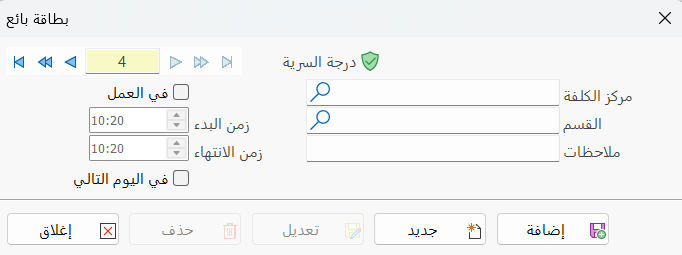
Once requested, it appears as follows:
Main Fields
The salesman card consists of several fields for adding all the information needed to define the salesman as one of the salesmen in alameen ERP:
Card Number and Navigation Buttons
Please see Serial Number and Navigation Buttons.
Security Level
Please see Security Level.
Cost Center
Set the cost center that the salesman you are defining a card for will belong to (this field is mandatory).
Department
You must set the department in which the salesman works, by typing it or entering its code; you can also look it up with the search icon in the field (this field is mandatory).
Notes
Enter additional information related to the salesman you are defining.
At Work
Enable this option so you can reset the start and end time of the salesman's shift.
Start Time
Set the actual time the salesman's working hours start.
End Time
Set the actual time the salesman's working hours end.
Next Day
Enable this option when the salesman's shift starts on one day and ends on the next.
For example, if the shift starts at ten o'clock in the evening and ends at four o'clock in the morning of the next day, you must enable the "Next Day" option.
Standard Commands
Please see Standard Commands.