Discount Card
This window defines the discount cards given to each customer. You set the type the card belongs to (which decides the discount percentage or value given to the customer), the status of the card (which decides whether the card is active), and the period during which the card is in effect.
You can open the discount card from the POS tab on the main ribbon - "Offers and Discounts" group.
Once requested, it appears as follows:
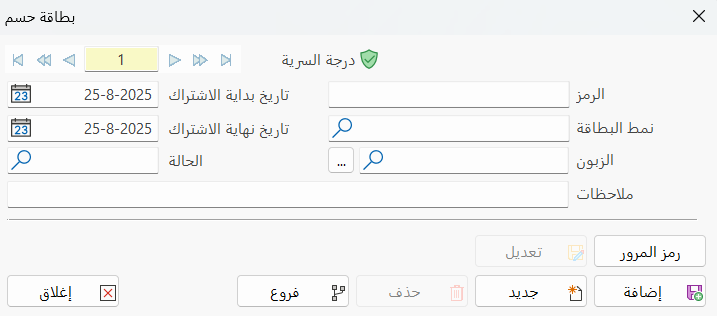
Main Fields
The discount card consists of several fields for adding the information needed to define the card:
Card Number and Navigation Buttons
Please see Serial Number and Navigation Buttons.
Security Level
Please see Security Level.
Code
Each discount card has a unique code; you can type the code according to standards you choose (this field is mandatory).
Card Type
Set in this field the discount card type to be used with this customer: the customer gets the discount percentage or value (as set in the discount type) when their invoice value equals or exceeds the amount recorded in the selected discount type.
Type the card type, or use the search icon in the field to choose it from the window that opens.
Customer
Enter the name or code of the customer who will get this discount card, or look them up with the "Search" button in the field.
Subscription (Start-End) Date
Based on the period saved in the discount card type set in this card, the discount is in effect from the customer's subscription start date. You can end this subscription (before the actual discount period ends) by recording a date earlier than the discount's expiry date in the "Validity End Date" field. Example: you want to give a customer a gold discount, but for a shorter period than the one set for this discount type.
Status
Type the status of this card, defined earlier in a discount card status card, to set whether the card is active.
Notes
Add the notes you want related to the discount card you are defining.
Password
Click the "Password" button to change the password with the fields of the window that opens.
Standard Commands
Please see Standard Commands.