Delivery Company Card
This card defines the delivery company you will work with to deliver orders: in the card you set the company's information and the commission account with its rate.
You can open the delivery company card from the POS tab on the main ribbon - "Settings" group - "Cards" button.
Once requested, it appears as follows:
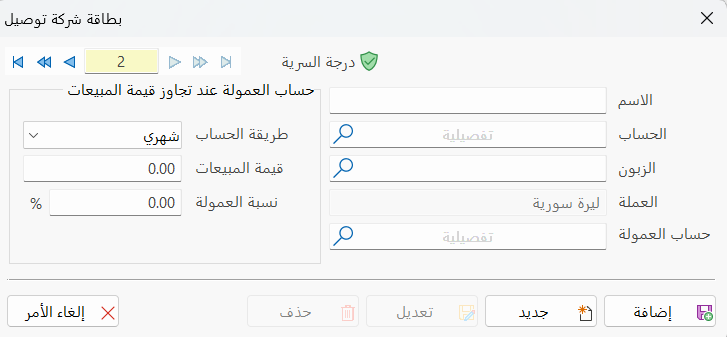
Main Fields
The delivery company card consists of several fields for adding all the information needed to define it as one of the delivery companies in alameen ERP:
Card Number and Navigation Buttons
Please see Serial Number and Navigation Buttons.
Security Level
Please see Security Level.
Name
Enter the name of the delivery company you are defining a card for (this field is mandatory).
Account
Enter the name or code of the account after defining it with an account card; you can also choose it from the account selection window that opens when you click the search icon in the field (this field is mandatory).
Customer
Enter the name or code of the customer after defining them; you can also choose them from the customer selection window that opens when you click the search icon in the field (this field is mandatory).
Currency
Set the currency you will use with the delivery company.
Commission Account
Enter the name or code of the commission account after defining it; you can also choose it from the account selection window that opens when you click the search icon in the field.
Calculate the Commission When Sales Exceed a Value
You can make the commission conditional on sales exceeding a certain value. For example, if the value of the sales (handled by the delivery company) exceeds ten thousand a month, the delivery company's commission is 2% of the total sales.
You can enter these conditions in the following fields:
Calculation Method
The program provides two calculation methods; you can choose one of them for calculating the commission:
Monthly (the default method), or Yearly.
Sales Value
Enter the sales value the delivery company must reach to get the commission rate (this field is mandatory).
Commission Rate
Set the rate the delivery company will get from the sales value after exceeding the value set in the previous field (this field is mandatory).
Standard Commands
Please see Standard Commands.