Material Card - Asset Information
You can define the current material as a fixed asset material by setting the material type to "Fixed Asset" on the "Options" tab of the material card.
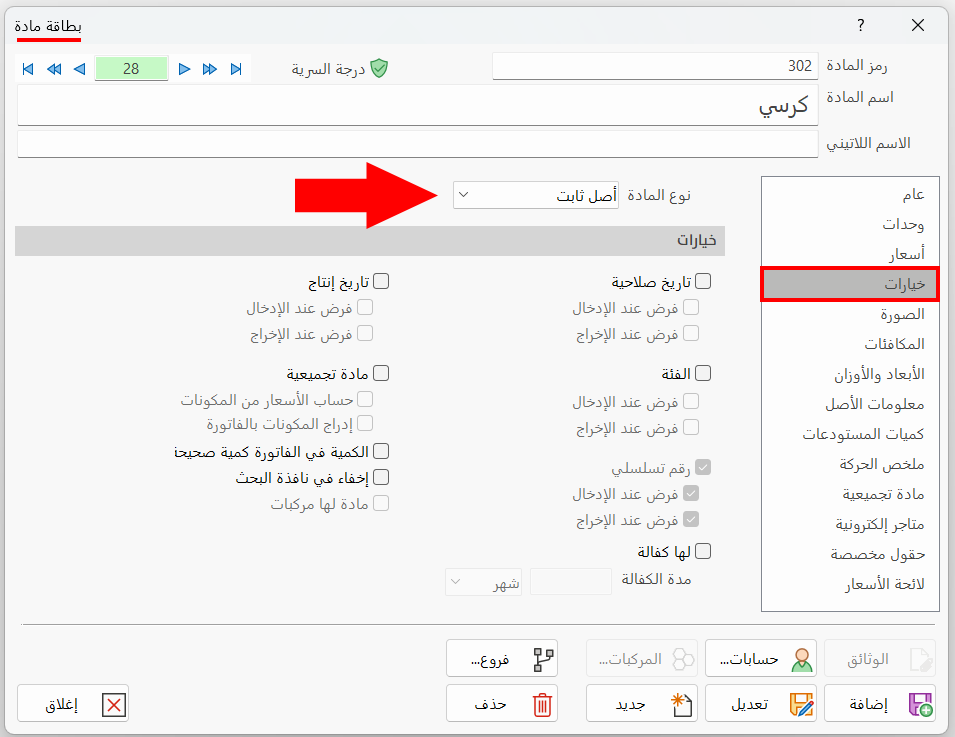
After you set the material type to "Fixed Asset", the Serial Number option (Force on Input, Force on Output) is enabled automatically, so that you can see the operations carried out on each of the assets.
For example, when you buy 10 chairs with the same specifications, you can see the operations carried out on an asset (that is, on one of the chairs), whether maintenance, addition, or reduction, by the serial number of that asset (the chair).
After you set the material type to "Fixed Asset", the contents of the "Asset Information" tab appear, so you can set the asset accounts, the depreciation method, and the productive age, as follows:
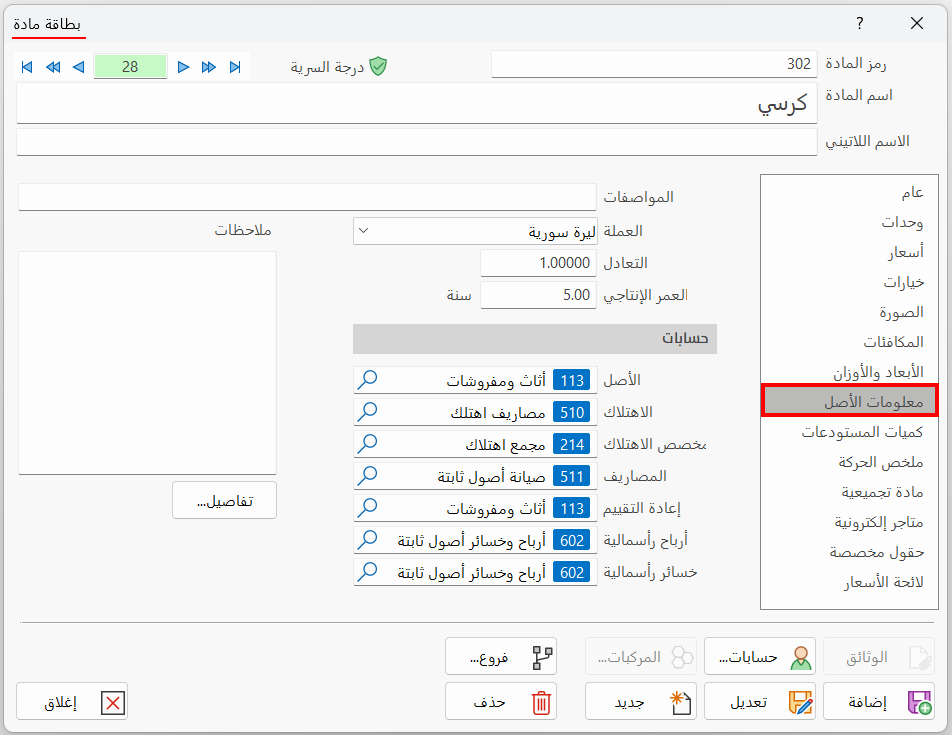
Specifications
Enter a description of the asset you are defining a material card for: you can type the specifications of the asset to distinguish it from other fixed assets.
Currency
You can choose in this field the default currency for renting this asset, by clicking the arrow in the field and choosing the currency.
Parity
The field shows the exchange rate of the currency you entered in the "Currency" field (the exchange rate of the chosen currency against the basic currency).
Productive Age
The productive age is the estimated period during which the asset remains fit for economic production.
Accounts
Set the accounts for each of the following:
Asset
Enter the asset account created in the chart of accounts under fixed assets, with the balance sheet as its final account. It is used in the journal entries generated by the addition, reduction, and maintenance operations carried out on the sub assets of this asset.
Depreciation
This account is created under the expenses account, with profits and losses as its final account. It represents the permanent and continuous decrease in the value of the fixed asset as a result of using it in the business's activity.
The main purpose of depreciation is to estimate the decrease in the value of fixed assets and deduct it gradually from the annual profits or add it to the losses, instead of charging it all at once to one accounting cycle or deducting it from the capital.
Accumulated Depreciation
This account is created under the current liabilities account, with the balance sheet as its final account. It is the account in which the depreciation account is closed: the balance of the accumulated depreciation account increases every year by the depreciation installment, until it reaches an amount equal to the value of the asset minus its sale value at the end of its productive age.
Expenses
This account is created under the expenses account, with profits and losses as its final account. It is the account to which the expenses related to each asset are posted.
Reevaluation
This account is created under the expenses account, with profits and losses as its final account.
Capital Gain
This account is created under the revenues account, with profits and losses as its final account. It is the account to which the revenues from selling the asset for more than its estimated sale value are posted.
Capital Loss
This account is added under the expenses account. It is similar to the capital gain account, except that the losses from selling the fixed asset for less than its estimated sale value are posted to it.
Details
After you click the button, the asset input and output details window opens with the serial numbers of the assets; you can also reach the sub asset card directly from that window.
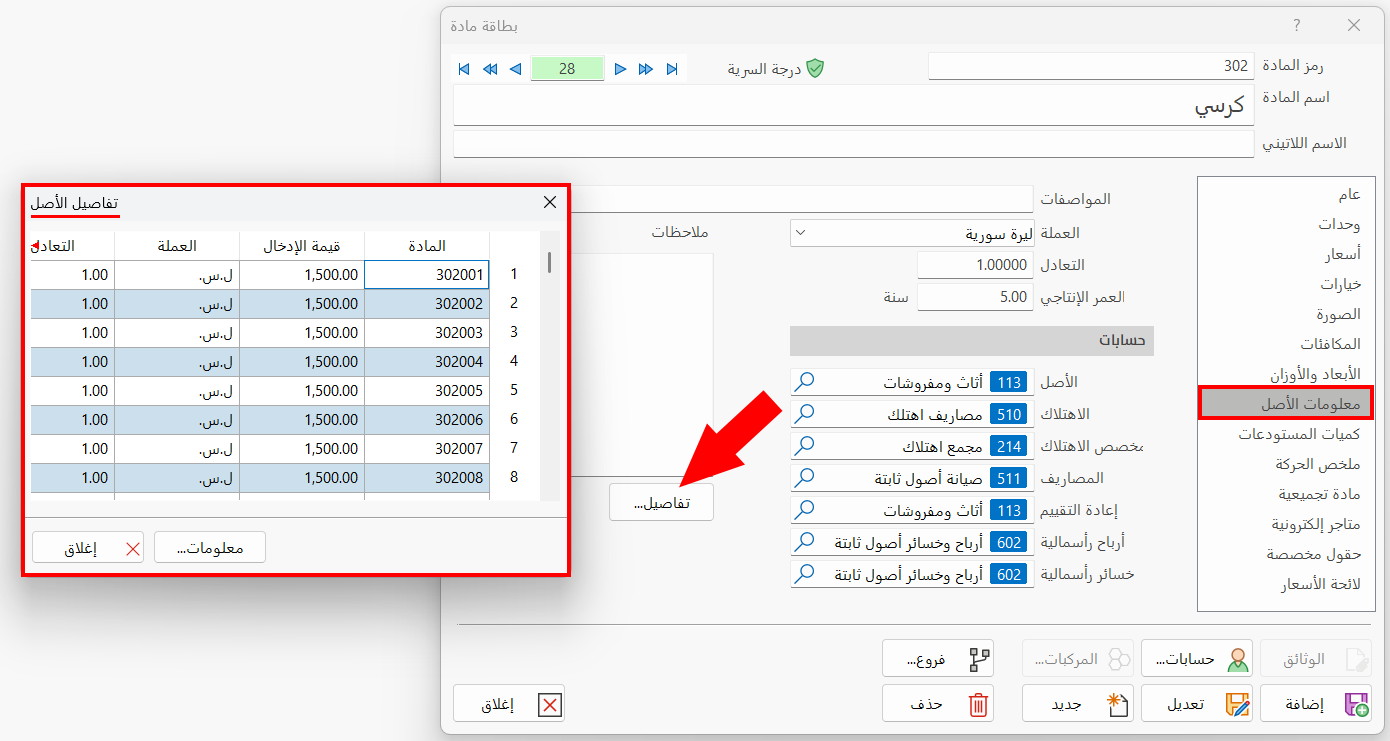
The details window does not open before the asset's input bill is issued.