Alternatives Card
The alternatives card classifies similar materials in a group of alternatives that carries one name. It also helps you arrange the materials and view them in the Alternatives Details report.
For example, you can create an alternatives card named "Sugar Alternatives" and enter the materials "White Sugar", "Coarse Sugar", "Fine Sugar", and others in it.
You can open the alternatives card from the Manufacturing tab on the main ribbon - "Settings" group.
Once requested, it appears as follows:
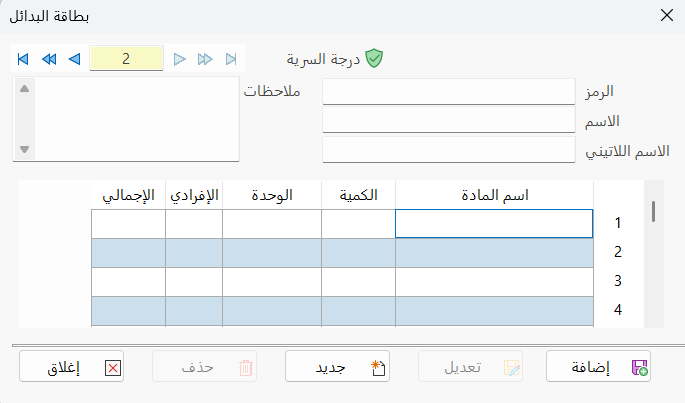
Main Fields
The alternatives card consists of several fields for adding all the information needed to define it in alameen ERP:
Card Number and Navigation Buttons
Please see Serial Number and Navigation Buttons.
Security Level
Please see Security Level.
Code
Enter the code of the alternatives you are defining a card for (this field is mandatory).
Name
Type in the field the name of the alternatives you are defining a card for (this field is mandatory).
Latin Name
You can enter the name of the alternatives in another language.
Notes
Write additional information or important notes about the alternatives you are defining a card for.
Alternatives Table
The table contains a set of fields for adding the group of materials that belong to the card:
Material Name
Type the name or code of the material to list in the card's alternatives table.
Qty
Set the quantity of the material to be used in the alternatives card.
Unit
Enter the unit of the material (box, can, piece...).
Unit Price
Enter in the field the price of the material according to the unit set in the Unit field.
Total Price
This field shows the total price of the material quantity.
Standard Commands
Please see Standard Commands.