Forms Group Card
Classifies forms groups in the chart of forms groups, so that each group contains a number of favorite forms.
You can reach the forms group card from the Management tab on the main ribbon - "Forms" group.
Once requested, it appears as follows:
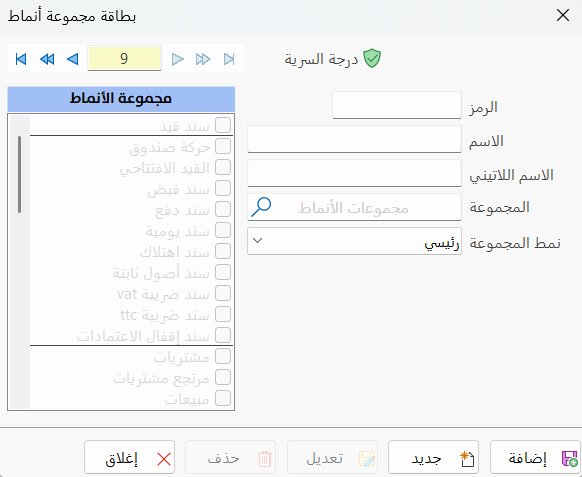
Main Fields
The forms group card consists of several fields for adding the information needed to define the card:
Card Number and Navigation Buttons
Please see Serial Number and Navigation Buttons.
Security Level
Please see Security Level.
Code
Each forms group has a unique code; you can type the code according to standards you choose (this field is mandatory).
Name
Enter the name of the group you are defining a card for (this field is mandatory).
Latin Name
You can enter the name of the forms group in another language.
Group
When you define a sub forms group, you must choose its main group: type the name of the group directly in the field, or click the search icon and choose from the window that opens, which lists all the main groups defined earlier in the program.
If the group you are defining is a main group, leave this field empty.
Group Style
The program lets you choose the group style: clicking the arrow in the field opens a list that contains:
Main: the program's default style. If you choose it, the group is classified in the chart of forms groups as a main group.
Sub: if you choose this style, the group is classified in the chart of forms groups as a sub group, so you must set the main group in the previous "Group" field.
Forms Group
This part is disabled because the default group style is "Main". It becomes available only when you choose the "Sub" style; you can then click the check box next to the form you want.
Standard Commands
Please see Standard Commands.