Materials Cost Card
The materials cost card enters or modifies the cost of a material that has no cost data in the current year, such as materials returned from previous years. This ensures that invoices are issued and returns are processed correctly, without errors in the accounts.
You open the materials cost card from the Invoices tab on the main ribbon - "Working Tools" group.
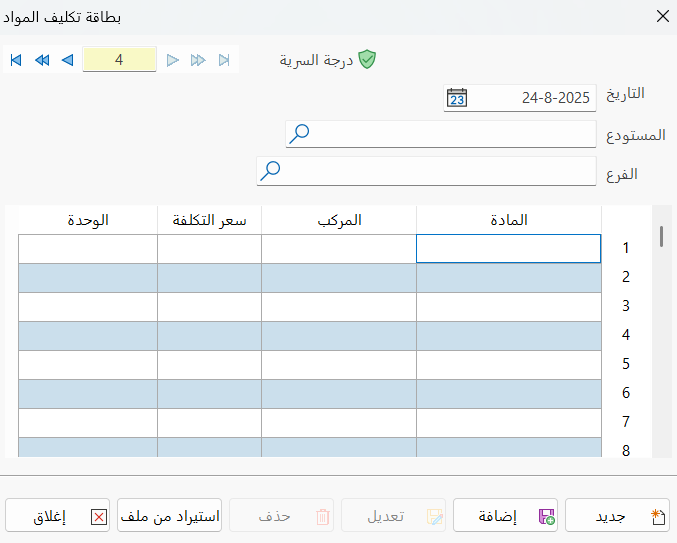
When you click the Materials Cost Card button, the window opens as follows:
Main Fields
The materials cost card consists of several fields for adding all the information needed to define it:
Card Number and Navigation Buttons
Please see Serial Number and Navigation Buttons.
Security Level
Please see Security Level.
Date
Used to choose the date of the materials cost card you are entering.
Warehouse
Type in this field the name of the warehouse the material will be in, or click the search icon to choose it from the warehouse selection window that opens.
Branch
Enter the name of the branch in the field, or click the search icon to choose it from the branch selection window that opens.
Material Table
Fill in the material data in the fields of the table: you can type the material name and its variants, as well as the cost price and the unit.
Import from File
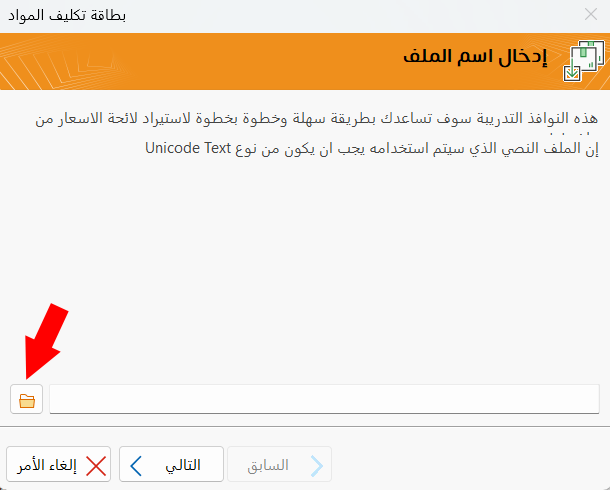
You can import a text file that contains the material name and price with the Import from file button: click the file icon in the window that opens, then choose the file of the year you want in the window that appears.
Standard Commands
Please see Standard Commands.
When you create a return invoice for a material that has no cost price, a warning message says that the material will not appear in the perpetual inventory entry at cost. So you must enter a materials cost card to set the cost of the material before creating a return invoice for it.