Contact Card
This card defines a contact and holds its data, to be used later in many operations and cards in the program.
You can open the contact card from the Invoices tab - Settings group; it appears as follows:
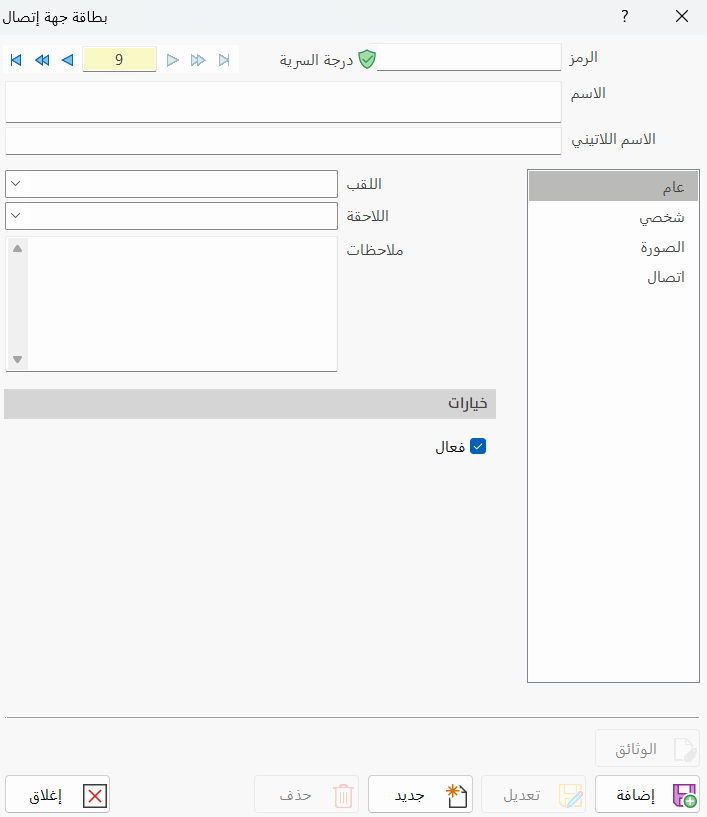
Main Fields
The contact card consists of several fields for adding all the information needed to define it as one of the contacts in alameen ERP 10:
Card Number and Navigation Buttons
Please see Serial Number and Navigation Buttons.
Security Level
Please see Security Level.
Code
Set in this field the code of the contact you are defining a card for (this field is mandatory).
Name
Type in the Name field the name of the contact you are defining (this field is mandatory), for example: Al-Madina Supermarket.
Latin Name
You can enter the name of the contact in another language.
Tabs
The contact card contains the following tabs:
General
Enter the contact's information in the fields of the tab:
Prefix
Enter the contact's prefix by typing it directly, or choose it, with the arrow in the field, from the prefixes added in the cards defined earlier.
Suffix
Enter the contact's suffix by typing it directly, or choose it, with the arrow in the field, from the suffixes added in the cards defined earlier.
Notes
Add additional information about the contact you are defining.
Options
The program lets you set whether the contact is active, with the check box next to the "Active" option: if the contact is no longer used, you can deactivate it to keep it from appearing in the list of contacts.
Personal
Enter the contact's personal information in the fields of the tab: you can type the data directly, or choose data entered in the cards defined earlier with the arrow in the following fields:
Nationality, Job, Nature of Work, Gender, Certificates, Hobbies, Person in Charge, and Date of birth.
Picture
You can add a picture of the contact with the "New" button: a new window opens for choosing the picture on the computer. You can later delete the picture with the "Delete" button.
Contact
Enter the contact information in the field of each means of contact. The program provides the following fields:
Phone 1, Phone 2, Mobile, Pager, Fax, Telex, E-mail, Website.
Standard Commands
Please see Standard Commands.