Asset Maintenance Card
The asset maintenance card records and follows up all the work related to maintaining the company's assets, so that each maintenance operation can be tracked by value, period, and the currencies used.
You can reach the card from the Assets tab on the main ribbon - "Operations" group.
Once requested, it appears as follows:
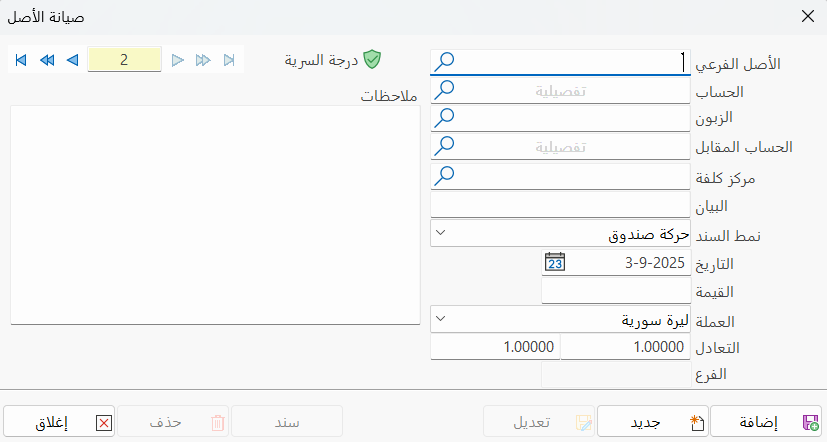
Main Fields
The asset maintenance card consists of several fields for adding all the information needed to define it in alameen ERP:
Card Number and Navigation Buttons
Please see Serial Number and Navigation Buttons.
Security Level
Please see Security Level.
Sub Asset
Enter the sub asset on which the maintenance was carried out, or look it up with the search icon in the field.
Account
Set the account from which the value of the maintenance was taken, or look it up with the search icon.
Customer
After you enter the account in the previous field, the name of the customer linked in the account card appears automatically, if there is one.
Contra Account
The program automatically fills the contra account field with the account added in the "Expenses Account" field of the material card.
You can change the account by typing it, or search for it with the search icon in the field.
Cost Center
If this asset belongs to a particular cost center (for example, a truck used in a particular project), you can enter the name or code of the cost center in this field. This links the operation to the selected cost center. (You can later see the expenses related to this cost center using the reports.)
Notes
Enter an additional explanation of the maintenance carried out on the fixed asset, such as painting the table.
Entry Form
Select the form to use for generating the entry from the drop-down list, by clicking the arrow in the field.
Date
In this field you set the date of the maintenance operation, by typing it or using the calendar window.
Value
Enter the amount of the maintenance operation in this field.
Currency
Set the currency you want to use for the asset maintenance, from the drop-down list of the field.
Parity
The parity appears automatically after you select the currency in the previous field.
If you select the basic currency of the file, the parity is (1).
If you select a different (previously defined) currency, the fields show the currency parity and the equivalent.
Branch
This field shows the branch where the asset to be maintained is located.
Notes
You can add information related to the asset in the "Notes" field.
Standard Commands
Please see Standard Commands.