Cost Center Budget Card
The cost center budget card sets the budget value of a cost center over a specific period, that is, the amount the cost center must not exceed.
You can reach the card from the Accounts tab on the main ribbon - "Budget" group.
Once requested, it appears as follows:
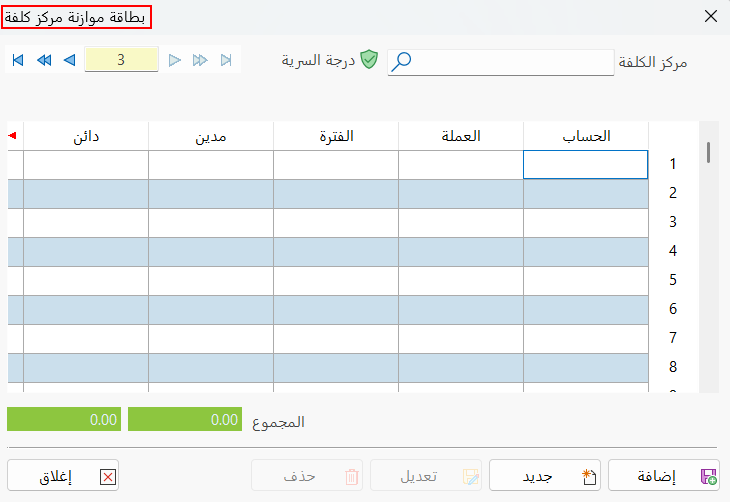
Main Fields
The cost center budget card consists of several fields for adding all the information needed to define it as one of the cost center budgets in alameen ERP 10:
Card Number and Navigation Buttons
Please see Serial Number and Navigation Buttons.
Security Level
Please see Security Level.
Cost Center
Set in this field the cost center for which you want to set an estimated budget, or look it up with the search icon in the field (this field is mandatory).
Account
Choose the account, linked to the cost center you want to budget, whose debit or credit value you want to set (this field is mandatory).
You can choose many accounts to list in the card's table. For example, if the cost center is a particular project, you can add all the accounts related to that project (purchases, wages...) in the Account column.
Currency
Set automatically to the basic currency used in the program when the file was created (see Program Options > Default Values).
Period
Set in this column an accounting period you defined earlier in Program Options > Accounting Periods: double-click the cell you want to fill in the "Period" column to open a list of the defined accounting periods.
You can also choose "None"; in that case, the program's default accounting period is used, which is the fiscal year defined when the file was created (see Program Options > Default Values).
Debit
Enter the debit amount, if any, in this column. Debit or credit data is mandatory, so one of the two columns must be filled in.
Credit
Enter the credit amount, if any, in this column. Debit or credit data is mandatory, so one of the two columns must be filled in.
If you add more than one account to the card, you can give each account its own value (credit or debit), or set the total value of the cost center budget in the column of one of the accounts and leave the other columns empty.
Branch
You can set the branch of each account, or the branch the cost center belongs to.
Total
This field shows the total of the amounts entered in the "Debit" and "Credit" columns, each separately.
Standard Commands
Please see Standard Commands.
An account budget card (or cards) is generated automatically after you add any cost center budget card that includes one or more accounts linked to the cost center.
You cannot add a cost center budget card if you do not set the account that belongs to the cost center.