Enter Basic Currency
This is the ninth stage of creating a new file, following the opening date step. In it, you enter the basic currency used in the program's operations, such as invoices and financial entries, together with the currency code, the name of its fraction, and the ratio of the fraction to the basic currency.
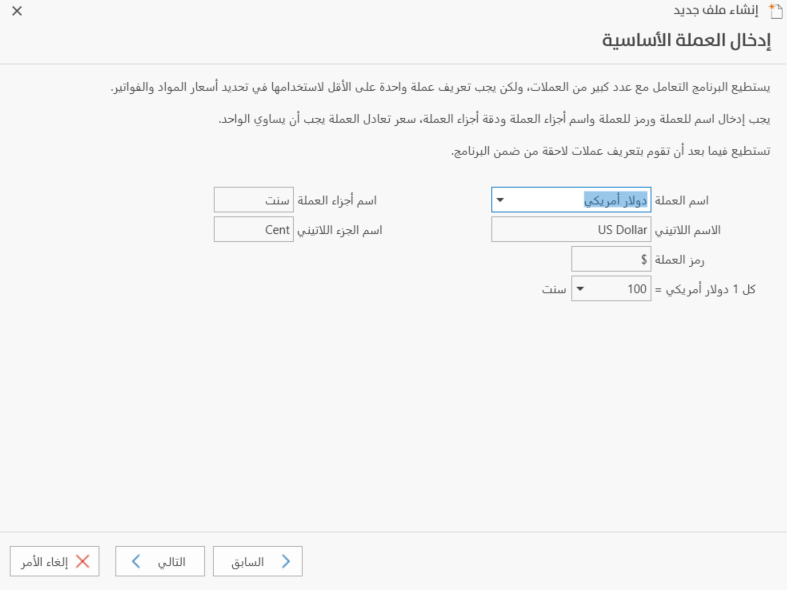
Currency Name
Set in this field the main currency you want to use in sales and purchase invoices, receipt and payment vouchers, and material prices, or look it up with the drop-down list on the side.
Latin Name
After you choose the main currency, its name in Latin script appears in this field automatically; you cannot edit or delete it.
Currency Code
After you choose the currency, its code appears in the field automatically, and you cannot change it.
Part Name
The program fills in the name of the main currency's fraction after you choose the currency in the "Currency Name" field.
Latin Part Name
The name of the currency fraction in Latin script appears as soon as you choose the currency name.
Ratio of the Main Unit to the Fractional Unit
The main unit is the name of the basic currency, and the fractional unit is the name of its fraction. The program shows the relation between the currency and its fraction, for example: 1 US dollar = 100 cents.